The Claude Cowork playbook: a non-developer's guide to desktop AI automation
A practical guide to using Claude Cowork: what it does well, where it still trips up, and how to brief it so it actually does finish the work for you.
I gave Claude a folder of 200 client invoices and asked it to build me a summary spreadsheet. Twelve minutes later I had one: supplier, date, net, VAT, total, sorted by month, with three duplicates flagged in red. I didn’t write a formula. I didn’t open a single PDF. I made a coffee while it worked.
That’s the thing nobody quite prepares you for about Claude Cowork. It doesn’t tell you how to build the spreadsheet. It builds the spreadsheet. And once you’ve watched it do that a few times, the way you think about AI at work shifts. The model hasn’t suddenly got cleverer — someone has finally given it a desk, a computer and permission to use them.
I’ve been living in Cowork daily for a few months, and I’ve landed on a clear view. It’s the most useful AI tool I’ve put in front of non-technical colleagues, but only if they let go of the one habit chat taught them. Stop prompting it like a chatbot. Start briefing it like a capable assistant who happens to have a computer in front of them.
Where Cowork actually sits
For most people there were two ways to work with Claude. You could chat with it — ask a question, get an answer, copy the answer somewhere useful. Or, if you were technical, you could use Claude Code and let it loose on your actual files from the command line. The first was friendly but limited. The second was powerful but came with a terminal, which is where most sensible people quietly back out of the room.Cowork lands in the middle, and Anthropic is refreshingly honest about why it exists. Inside the company, non-technical teams in marketing and data had started bypassing the chat interface for Claude Code, because they wanted something that could do the work rather than describe it. Cowork is that same capability with the terminal taken away. It runs on your desktop, inside an isolated environment on your own machine, and it reads, edits and creates files in the folders you point it at. It’s there on every paid plan, straight from the Claude desktop app, so there’s nothing to install beyond the app you may already have open.
You give it the outcome. It handles the steps in between.
All of which is worth saying plainly, because the marketing around AI rarely does: this is a tool for people who want AI to do things, not talk about them.
The mental shift that makes it work
Most people stumble in the same place in their first week, and I include myself. They open Cowork and treat it like a smarter chatbot — one instruction at a time, checking each step, holding its hand through the task as if it might wander off. It works, but it's exhausting, and it's nothing like the gain you were promised.The trick is to treat it less like a search box and more like a new hire who’s genuinely good but has never met you. A good assistant doesn’t need every keystroke dictated. They need three things: context about what you’re trying to achieve, a clear picture of what “finished” looks like, and the freedom to get on with it. Cowork is the same. The more of your world you hand it up front, the less you have to correct on the way through.
This is really just context engineering applied to a desktop — giving the tool enough of your situation that it can make sensible decisions without checking back every thirty seconds. Tell it the spreadsheet is for your accountant and it formats differently than if you’d said it’s for a board pack. Mention that the invoices come from three suppliers who each date things their own way, and it stops tripping over the inconsistency you forgot to warn it about.
What it's genuinely good at
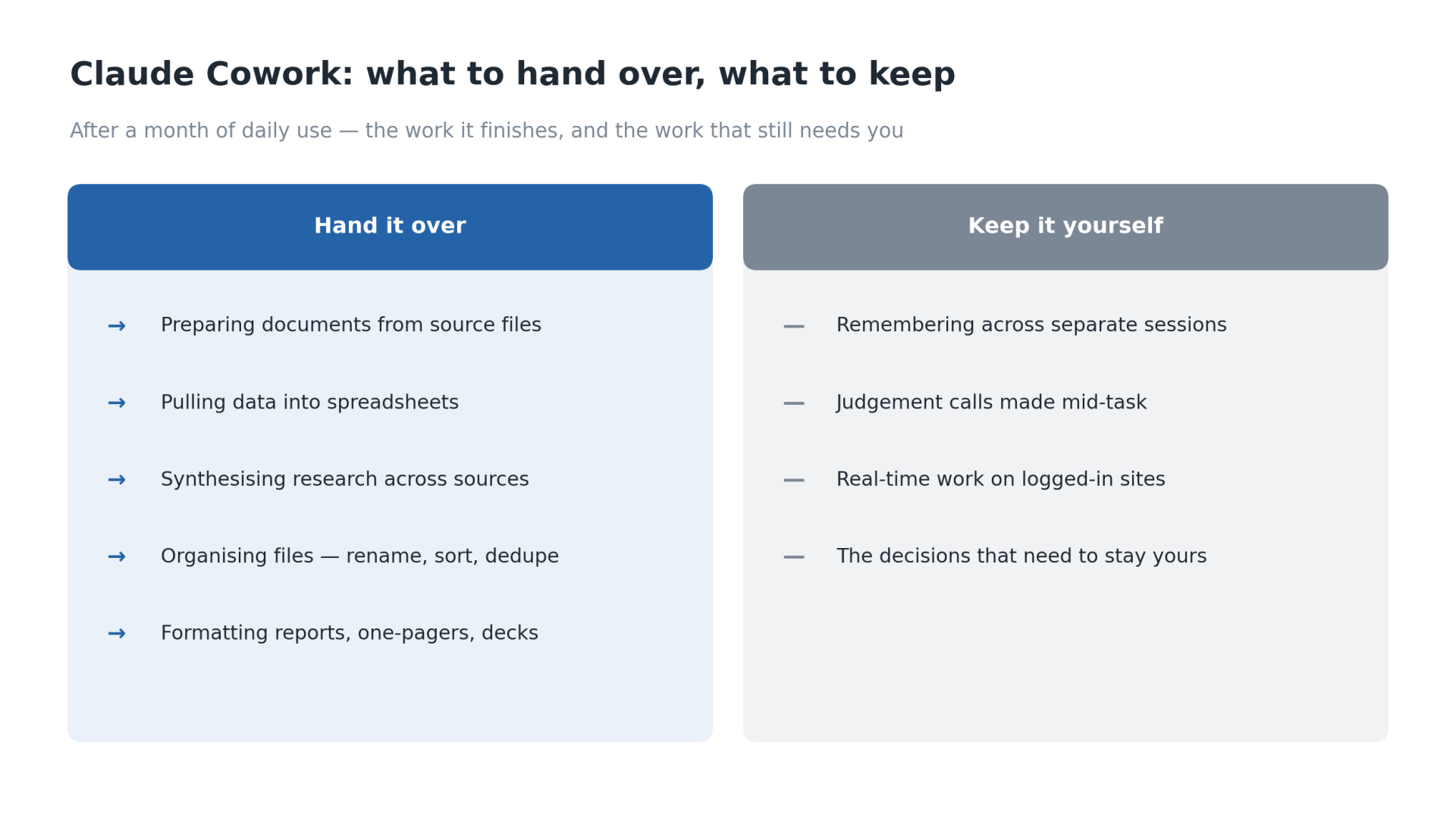
After a bit of time, a clear shape has emerged for the work Cowork does brilliantly, and it's almost always work that's high-effort, repetitive and a little bit dull.Document preparation is the obvious one. Hand it a folder of source files — notes, a transcript, a couple of reports — and ask for a structured first draft. Pulling the pieces together is the slow part of any report, and Cowork does the pulling-together so the work that’s left is yours: the judgement, the argument, the bits that actually need you. Spreadsheet work is the same story. The invoice job above is typical; getting numbers out of unstructured documents and into something you can sort and total is exactly the task that eats an afternoon and that everybody hates.
Research synthesis is a quieter strength. Give it a question and a pile of sources — a stack of PDFs, a few web pages you’ve saved — and it reads the lot, then comes back with a summary that notes which source each point came from, so you can check the ones that matter before you rely on them. Not flawless, but a long way past a blank page. File organisation is the least glamorous and possibly the most satisfying — point it at the digital equivalent of a messy drawer, three years of downloads and attachments, and ask it to rename, sort and deduplicate. That job never reaches the top of anyone’s list, and now it doesn’t have to.
And it formats properly, which sounds trivial until you’ve spent twenty minutes fixing someone’s headings. Rough meeting notes go in; a clean report, a one-pager, even a presentation comes out, looking like something you’d send rather than something you’d tidy up first. The common thread is honest manual labour. If a task is tedious but not subtle, Cowork is probably faster than you and certainly more patient.
What still trips it up
I'd be doing you no favours if I only told you the good half. There's a familiar pattern with these tools — most of it's brilliant, and a stubborn remainder is where you earn your keep. Cowork has its own version of that remainder.It doesn’t hold a thread across sessions the way a colleague would. Each run starts fresh unless you’ve deliberately set up a way for it to remember, so the long-running “keep an eye on this and update it weekly” job still needs you to bring it back up to speed. I once assumed it would recall last week’s tracker and it cheerfully built me a brand new one. I’m not sure whether that’s a deliberate choice about keeping each task clean or simply where the tool is right now, but either way you plan around it.
The bigger gap shows up when a task needs a judgement call halfway through. If the right next step depends on something only you know — which of two contradictory figures is the real one, whether a borderline expense is in or out — it will either guess or stop, and neither is what you want from an afternoon you’d hoped to skip. Hand it work where the path is clear and it flies; hand it work where the path forks on a decision only you can make, and you’re back in the room anyway.
Real-time work on authenticated websites is the third soft spot. Asking it to log into a portal, click around and pull down this month’s statements is the sort of thing that sounds easy and isn’t. For now the dependable boundary is your own files and folders, and honestly, that’s enough to be getting on with.
How to brief it so it can actually help
Prompting Cowork well is a different craft from prompting chat, and once you've got the shape of it there's little to remember. A good brief has five parts:- The goal, not the steps. Say what finished looks like and let the tool work out the route. "Summarise these invoices by supplier and month and flag any duplicates" beats a long list of instructions every time.
- The source. Point it at the exact folder or files, so it isn't guessing where to look or what's in scope.
- The output. Who it's for, what format, how it should look when it's done — "finished" means nothing until you've described it. A sheet for your accountant isn't a sheet for the board.
- The constraints. Front-load the things it can't guess and the things it mustn't touch: the quirk in your data, your team's convention, "don't move or rename the originals".
- When to come back to you. Tell it to stop and ask rather than guess whenever a real judgement call comes up — which figure is right, whether a borderline case is in or out. That's the line where you stay in charge, and you should: the consequential decisions are meant to remain yours.
The deeper change here goes beyond one piece of software. We’re still mostly in the asking habit — typing questions into a box and doing the assembly ourselves afterwards — when the real prize is handing over the work and keeping only the decisions that really need us. So give it the boring folder you’ve been avoiding, and see what comes back.